Change Language :
Free Robot Programming and Simulation Software
Program, simulate and control your robot yourself with license-free software
Program, simulate and control industrial robots with our licence-free software. The igus Robot Control software enables all customers such as engineers, machine builders and automation teams to configure articulated robots within a single platform. The range of robots consist of SCARA robots, delta robots and gantry systems.
The intuitive software allows customers to create motion sequences, real life test applications with integrated 3D simulation and accelerate commissioning using digital twin technology, ROS compatibility and PLC integration support.
If you are developing a new automation system or find yourself exploring robotics, perhaps an unfamiliar area , this software provides a cost-effective and simple way to build, test and optimise robotic applications.
What you will find on this page
Free robot software
- Simple connection between robot and control system
- Intuitive operation with 3D interface and digital twin enables direct execution and checking of motion sequences
- Camera interface configuration possible directly via control system and software
- Programming of delta, linear, SCARA and articulated arm robots
- Software enables risk-free testing even before purchase
System requirements:
- PC with Windows 10 operating system
- Communication via Ethernet or WLAN
- 500MB of free disk space
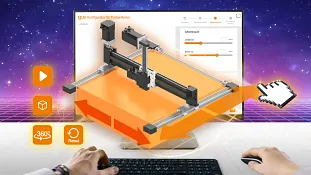
Interfaces
PLC interfaces
The PLC interface (PLC = Programmable Logic Controller) enables the execution of basic functions and the signalling of states by means of digital inputs and outputs. In addition to the control by a PLC, this interface also enables operation via hardware buttons.
Digital inputs and outputs
Robot programs can be loaded and started and gripper commands can be sent via digital inputs or global signals. This is useful, for example, if a program is to be selected from a given selection using buttons or the CRI-GSig instruction.
Modbus TCP/IP
The Modbus TCP interface can be used to send PLC data and instructions to the robot control system and receive status information, for example.
CRI interface
The CRI interface enables complex instructions to be sent and information and settings to be retrieved via the Ethernet interface using TCP/IP. The igus Robot Control uses this interface to connect to robots with an integrated control system or other instances of the control system.
Camera interface
The camera interface enables the use of object detection and video cameras. Object detection cameras recognise the position and class of objects and transmit these, optionally with a video image, to the control system. The control system calculates positions in the robot coordinate system from the object positions of the camera. Pure video cameras only deliver images and can therefore only be used to monitor the work area, but not to detect objects.
Cloud
The Cloud interface enables the robot to be monitored via RobotDimension. Once activated and logged in, the robot sends basic status information and camera images to the online service. The user can list their robots on the website and retrieve the information.
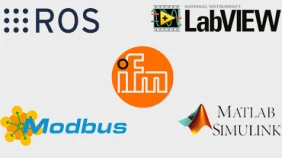
ROS, Matlab, LabView, and many more.
Integrate the robots into your ROS environment. Documentation and packages for hardware communication, Teleop and moveI
Project configurations


Programming
Axis movements- The Joint command moves the robot to an absolute target position that is specified in axis coordinates (e.g. axis angle or position of a linear axis). The resulting movement of the TCP is usually a curve and not a straight line.
Linear movement- The Linear command moves the robot to an absolute target position specified in Cartesian coordinates. The resulting movement of the TCP follows a straight line.
Circular movement- The instruction "Circular movement" enables movements along a full or partial circular path. It is compatible with linear movements so that the transition from and to linear movements can be smoothed over.
Conditions- Conditions can be used in if-then-else commands, loops and as cancellation conditions in motion commands. The conditions can be combinations of digital inputs, global signals, Boolean operations and comparisons.
Matrix calculation- The grid instructions calculate positions aligned to a grid, e.g. as a gripping or depositing position for palletising tasks.
Relative- The Relative command allows you to move the robot relative to its current position. It can be accessed via the menu items under "Action" → "Relative movement".
Sub-programs- Sub-programs can be called up with the sub-command. The path to the sub-program file is specified under "File name". It is relative to the subfolder "Programs" of the iRC folder "Data".
Variables and variable access- Two types of variables are supported in the program for igus Robot Control and TinyCtrl: Number variables: These can be used to store integer or floating point numbers. Position variables: These can be used to store Cartesian positions and joint positions. Whether such a variable is interpreted as a Cartesian position or joint position depends on the context.
Download robot software
The licence-free igus Robot Control software is integrated into the control system and therefore uses a standardised operating concept and consistent communication services for many components of one system. This means less project planning work and faster commissioning.
- Test all igus kinematics in advance in the software
- With pre-programmed projects for all igus robots, single axes and AGVs
- Intuitive 3D interface with simulation of the robot
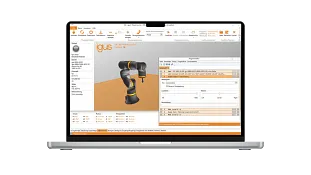
Sample programs, wiki and training courses
Useful links
Frequently asked questions
Depending on the type of robot depends on the way it is controlled. A lot are automated and are programmed using interfaces, some digital twin simulation and some, like the igus robot control software are from a license free platform which allows manufacturers, automation engineers and people who know nothing about robotics and software simplify robot integration and commissioning.
Known as RPA, Robotic Process Automation software allows bots as a way of automating repetitive tasks. Commonly tasks like data entry are prime examples of where this software works well. This is all about automating processes as opposed to controlling robots.
Robot software is a program that can program robotic systems, controlling robot movement, including repetitive sequences.
There is specific software for robotic systems. This software allows a user to program, simulate and operate robots.
There are multiple types of robots that are compatible with the robot control software. These include articulated robots, SCARA robots, delta robots and gantry systems.
With our software, it has been designed so that you don't need programming knowledge. There is technical support should you need it but the premise behind the igus robot control software is that you shouldn't need the help
Contact us
Contact details
Adam Sanjurgo01604 677240Contact us
Opening hours
Office hours
Monday to Friday from 8 am - 8 pm.
Live chat:
24h